

Warehouse Barcode Scanning
Move through warehouse tasks faster with barcode scanning.
Identify the right product as goods arrive, orders are picked and stock is counted.
Built for your everyday inventory operation
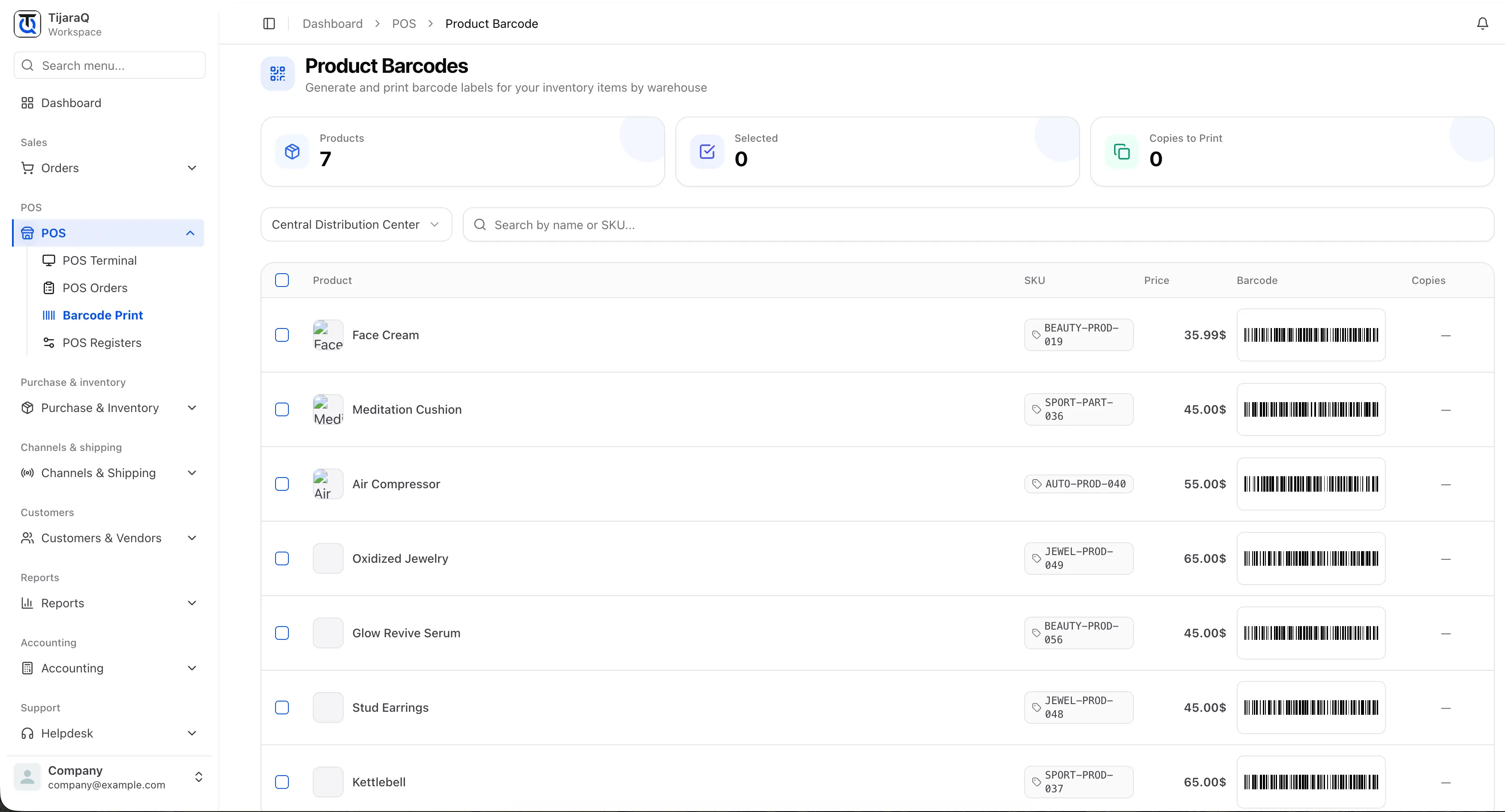
Barcode Scanning
Less searching. More attention on the item.
Searching by product name slows down a physical task. Matching a SKU or barcode helps the team identify the right item where the work happens.
Prepare the identifier
Make sure the product has the SKU or barcode your team will scan.
Scan in context
Identify the product in the warehouse task at hand.
Continue the task
Record the received quantity, picked item or physical count.
Stock-count lookup
Jump to a matching row’s counted-quantity field.
Warehouse identification
Identify products during receiving and picking.
Product labels
Generate and print barcode labels for products by warehouse.
Frequently asked questions
Good questions. Clear answers.
Does scanning automatically count an item?
Stock Count scanning finds the matching row and focuses its quantity input. Your team still enters the counted quantity.
Does the pictured screen show scanning?
No. It shows barcode label printing. The Stock Count workflow has a scan input for finding a matching product row.
TijaraQ
One inventory operation across every place you sell.
Bring stores, warehouses and connected sales channels into one inventory workflow.